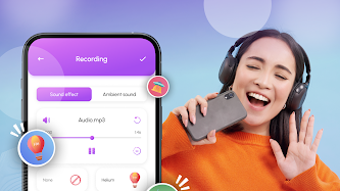

Download Sound Effects - Voice Changer – sound effects, voice changer, ringtone maker, audio editor, MP3 cutter, voice effects, android app, free audio tool, fun sound effects, creative audio editing
Overview
Sound Effects - Voice Changer is a mobile application designed for users seeking creative ways to modify and enhance their audio content. As an Android-based tool, it serves individuals interested in experimenting with sound, whether for personal entertainment, social media content, or custom device ringtones. The app enables users to apply a variety of voice effects, such as robot and monster tones, to transform their voice recordings in real time or post-recording.
It also includes a ringtone maker and MP3 cutter, allowing users to extract and customize audio segments from longer files. These features make it suitable for casual users, content creators, and anyone looking to add a playful or unique twist to their audio experience. The developer, Sound Effects - Voice Changer, has positioned the app as a free multimedia utility focused on accessibility and fun.
While no additional background on the developer was provided, the app’s purpose is clear: to offer an intuitive platform for audio manipulation on mobile devices. Real-world use cases include creating custom ringtones for personal devices, producing entertaining voiceovers for videos, or simply experimenting with different vocal styles for fun.
Key Features & Capabilities
- Voice Changer Effects: Apply a range of real-time and post-recording voice transformations, including robot, monster, and other creative vocal distortions. Ideal for adding humor or uniqueness to voice messages and recordings.
- Ringtone Maker: Convert any audio clip into a personalized ringtone. Users can select specific segments of a song or recording and save them as custom ringtones for their Android device.
- MP3 Cutter: Trim and edit audio files by selecting start and end points. This feature supports quick extraction of short clips for sharing or reuse in other projects.
- User-Friendly Interface: Designed with simplicity in mind, the app allows users of all skill levels to navigate tools and apply effects without requiring prior audio editing experience.
- Free Access: The app is available at no cost, making it accessible to a wide audience seeking basic audio editing tools without financial commitment.
These features support practical workflows such as creating unique ringtones from favorite music, modifying voice messages for entertainment, or preparing short audio clips for social media platforms. The app’s focus on ease of use ensures that users can quickly achieve desired results without technical complexity.
User Interface, Workflow & Performance
The application presents a clean, intuitive interface optimized for touch-based navigation on Android devices. Core tools—voice effects, ringtone creation, and audio cutting—are arranged in a logical menu structure, allowing users to switch between functions with minimal effort. The workflow is streamlined: record or import audio, apply effects, trim if needed, and export or set as a ringtone.
Navigation is straightforward, with clear labels and visual feedback during editing processes. While specific performance metrics such as CPU usage, RAM consumption, or processing speed were not provided, the app’s lightweight nature—measuring 15.6 MB in size—suggests efficient resource utilization. The developer did not specify detailed performance data, but general mobile application behavior indicates smooth operation on modern Android devices.
Stability appears to be maintained through regular updates, which may include bug fixes and optimization improvements. Users can expect consistent behavior during common tasks like effect application and file export, though exact behavior under heavy workloads remains unspecified.
Compatibility & System Requirements
Sound Effects - Voice Changer is designed for Android operating systems. The app is available in version 1.2.1 and has a file size of 15.6 MB. The developer did not provide additional system requirements, including minimum Android version, RAM, or processor specifications.
Compatibility information is limited to the OS platform. Exact hardware or software prerequisites were not listed. Users should ensure their device supports standard audio recording and editing functions, as required by the app’s core features.
The developer did not specify whether the app supports tablet devices or only smartphones. Platform compatibility details are partially provided, and further technical specifications remain unknown.
Pros and Cons
Pros
- Free to download and use, making it accessible to a broad audience.
- Intuitive interface suitable for users with no technical background.
- Offers multiple audio editing tools in one application.
- Includes fun and creative voice effects for entertainment and personalization.
- Supports ringtone creation and MP3 cutting for practical daily use.
Cons
- Exact system requirements were not specified by the developer.
- Limited information on performance under heavy usage or long editing sessions.
- App is available only for Android, with no support for iOS or desktop platforms.
- No indication of cloud integration, backup, or file sharing capabilities.
- Advanced editing features such as audio mixing or multi-track editing were not mentioned.
FAQ Section
Is Sound Effects - Voice Changer available for iOS devices?
The app is currently designed for Android operating systems. No information was provided about iOS compatibility or availability on Apple devices.
Is the app safe to download and use?
As a free Android application, it is distributed through official app channels. Users should ensure downloads are made from trusted sources such as the Google Play Store to maintain device security. The developer did not provide explicit security details.
How often are updates released?
The app has been updated regularly, with the latest version released on 2023-09-15. While update frequency is not specified beyond this, the developer has maintained active development to improve functionality and user experience.
Does the app require an internet connection?
Basic audio editing features such as voice changing, cutting, and ringtone creation can be performed offline. However, some features like cloud syncing or updates may require an internet connection.
What type of license does the app use?
The app is distributed as free software with no visible licensing restrictions. It is available at no cost, and the developer did not specify additional licensing terms beyond the free access model.
Final Thoughts + CTA
Sound Effects - Voice Changer delivers a fun, accessible, and practical solution for users looking to personalize their audio content on Android devices. With its combination of voice effects, ringtone creation, and MP3 cutting tools, the app serves both casual users and content creators who want to experiment with sound without complexity. Its lightweight design and free availability make it an attractive option for mobile audio editing.
While technical details such as system requirements and performance under load are limited, the app’s consistent updates and user-friendly workflow suggest ongoing support and usability. For anyone seeking a simple yet effective way to transform audio, this tool provides a solid foundation for creative expression. Download Sound Effects - Voice Changer now.







